
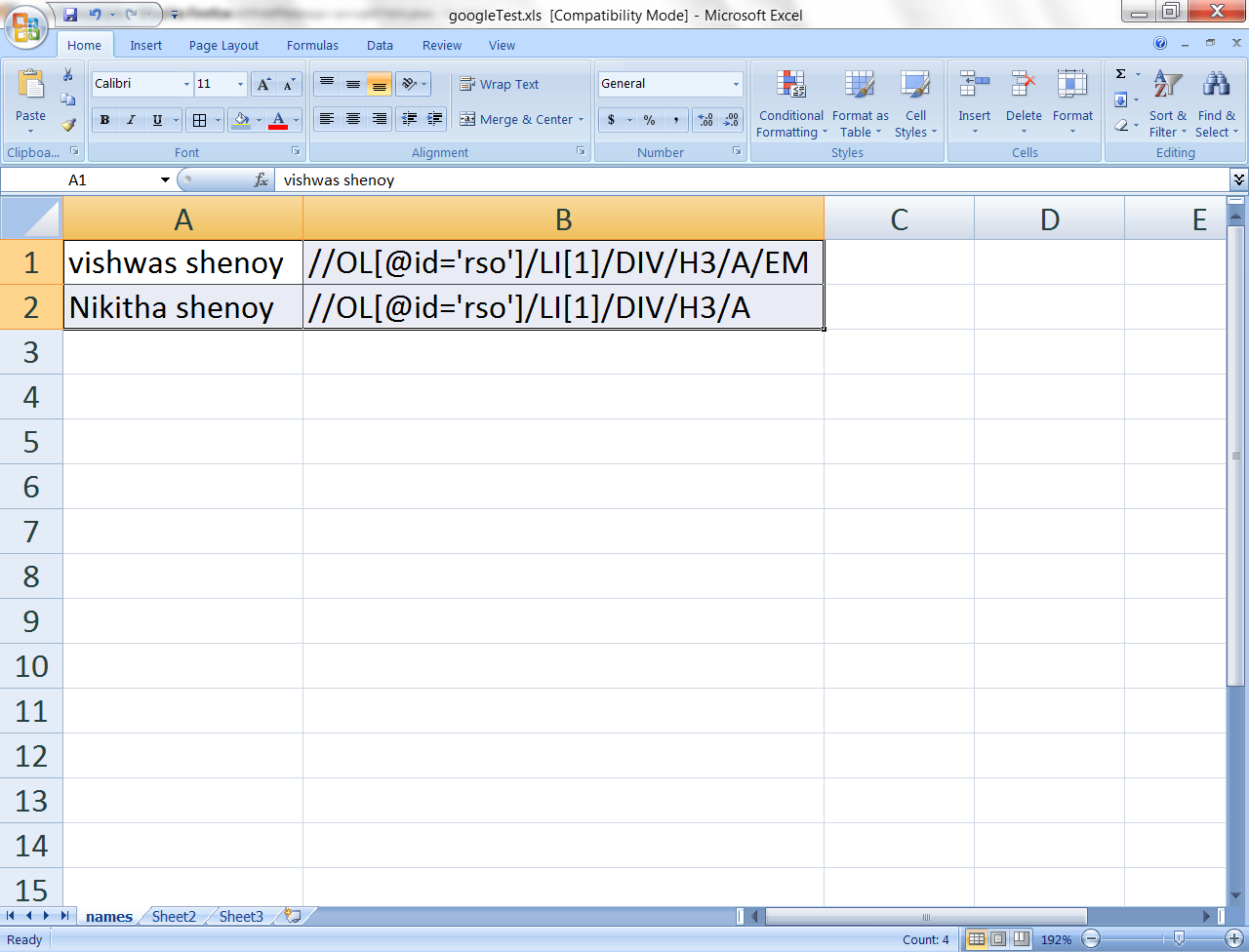
In this post, i will given an example of data driven test that i carried out on google.com.
I saved a excel with data – Input string for search box & the xpath of the links in search result that i want to click. The above snap shows the excel with data.
package DataDrivePackage;
import com.thoughtworks.selenium.*;
import junit.framework.TestCase;
import org.junit.AfterClass;
import org.openqa.selenium.By;
import org.openqa.selenium.WebDriver;
import org.openqa.selenium.WebElement;
import org.openqa.selenium.ie.InternetExplorerDriver;
import org.openqa.selenium.server.SeleniumServer;
import org.testng.annotations.*;
import java.io.File;
import java.io.FileInputStream;
import java.io.InputStream;
import java.util.Iterator;
import java.util.concurrent.TimeUnit;
import jxl.*;
import org.apache.poi.hssf.usermodel.HSSFCell;
import org.apache.poi.hssf.usermodel.HSSFRichTextString;
import org.apache.poi.hssf.usermodel.HSSFRow;
import org.apache.poi.hssf.usermodel.HSSFSheet;
import org.apache.poi.hssf.usermodel.HSSFWorkbook;
import org.apache.poi.poifs.filesystem.POIFSFileSystem;
import org.apache.poi.ss.usermodel.Cell;
import org.apache.poi.ss.usermodel.Row;
public class googleTest {
WebDriver d = new InternetExplorerDriver ();
@BeforeClass
public void envSetup()throws Exception
{
d.get(“http://www.google.co.in/”);
System.out.println(“opened the browser”);
}
public void checkUrl()throws Exception
{
if (d.getCurrentUrl() != “http://www.google.co.in/” )
{
System.out.println(“yes google is not on”);
d.get(“http://www.google.co.in/”);
d.manage().timeouts().implicitlyWait(5, TimeUnit.SECONDS);
}
}
@Test (dataProvider = “dp”)
public void gTest (String searchString, String clickLink)throws Exception
{
System.out.println(searchString+” “+ clickLink);
d.findElement(By.xpath(“//INPUT[@id=’gbqfq’]”)). sendKeys (searchString);
WebElement e = d.findElement(By.xpath(“//INPUT[@id=’gbqfq’]”));
e.submit();
d.manage().timeouts().implicitlyWait(5, TimeUnit.SECONDS);
d.findElement (By.xpath(clickLink)).click();
checkUrl();
}
@DataProvider(name = “dp”)
public Object[][] sendData ()throws Exception
{
Object[][] retData = getArrayTable (“C:\\selDataFolder\\googleTest.xls”);
return (retData);
}
public static String[][] getArrayTable (String xlPath) throws Exception
{
int r = 0, c =0;
InputStream inputStream = new FileInputStream(xlPath);
POIFSFileSystem fileSystem = new POIFSFileSystem (inputStream);
HSSFWorkbook workBook = new HSSFWorkbook (fileSystem);
HSSFSheet sheet = workBook.getSheetAt(0);
Iterator<Row> rows = sheet.rowIterator();
int totalRows = sheet.getPhysicalNumberOfRows();
HSSFRow row1 = sheet.getRow(1);
int totalCols = row1.getLastCellNum();
String[][] tabArray = new String[totalRows][totalCols];
while (rows.hasNext())
{
Row row = rows.next();
Iterator<Cell> cells = row.cellIterator();
while (cells.hasNext())
{
Cell cell = cells.next ();
tabArray[r][c] = cell.getStringCellValue ();
++c;
}
c=0;
++r;
}
return tabArray;
}
}
Explaination
1. I create a input stream of type file inputstream.
2. Created a POIFSFileSystem, taking this file input stream as parametr.
3. Created a HSSF workbook, to access the excel.
4. Created a Iterator of Row class type. Using this iterator, i can get a collection of rows in the sheet with the pointer at row beginning.
5. using hasNext() method, i move thru the rows.
6. I create a object of type Row class to store the pointer to the next row as i iterate.
7. Similarly, i iterate thru the cells in the same way as i explainted for the rows above.
8. Store the result in a array and return it.
 vishwasshenoy